Module Preview

A WordPress plugin is a bit of code that you can use to extend the features or capabilities of your current WordPress site. For instance, you can add forms, videos, a paywall, or even a learning management system directly into your WordPress site using plugins. Some plugins are quite complex and require technical knowledge to implement, whereas others are easy and just need a click of a button to get started.
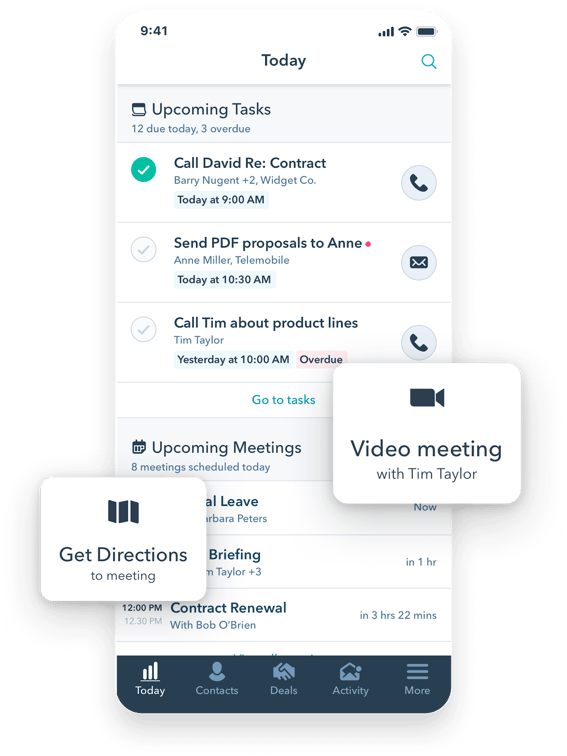
Popular HubSpot WordPress plugin features include:
- CRM and contact management right within WordPress
- Live chat and chatbots
- Website analytics, including exit intent
- Forms and pop-ups to re-engage customers
- Marketing automation
HubSpot’s WordPress plugin is free to use. If you’re looking for more advanced features to help automate and scale your business operations, HubSpot also offers premium plans with Starter, Professional, and Enterprise editions of Marketing Hub.
Depending on how technical your team is, implementation time may vary. For companies with limited technical resources, the implementation time can be a bit longer. Mapping, embedding, and ensuring that the code is working correctly is the most significant piece of implementation.
At HubSpot, we work with WordPress businesses to integrate their products into the free HubSpot CRM. We also partner with agencies and hosting providers to help businesses around the world grow better.
If you'd like to integrate your plugin or theme with HubSpot or have an idea for a different partnership effort, please fill in this form and we'll get back to you shortly.
A WordPress plugin is a bit of code that you can use to extend the features or capabilities of your current WordPress site. For instance, you can add forms, videos, a paywall, or even a learning management system directly into your WordPress site using plugins. Some plugins are quite complex and require technical knowledge to implement, whereas others are easy and just need a click of a button to get started.
Popular HubSpot WordPress plugin features include:
- CRM and contact management right within WordPress
- Live chat and chatbots
- Website analytics, including exit intent
- Forms and pop-ups to re-engage customers
- Marketing automation
HubSpot’s WordPress plugin is free to use. If you’re looking for more advanced features to help automate and scale your business operations, HubSpot also offers premium plans with Starter, Professional, and Enterprise editions of Marketing Hub.
Depending on how technical your team is, implementation time may vary. For companies with limited technical resources, the implementation time can be a bit longer. Mapping, embedding, and ensuring that the code is working correctly is the most significant piece of implementation.
At HubSpot, we work with WordPress businesses to integrate their products into the free HubSpot CRM. We also partner with agencies and hosting providers to help businesses around the world grow better.
If you'd like to integrate your plugin or theme with HubSpot or have an idea for a different partnership effort, please fill in this form and we'll get back to you shortly.
A WordPress plugin is a bit of code that you can use to extend the features or capabilities of your current WordPress site. For instance, you can add forms, videos, a paywall, or even a learning management system directly into your WordPress site using plugins. Some plugins are quite complex and require technical knowledge to implement, whereas others are easy and just need a click of a button to get started.
Popular HubSpot WordPress plugin features include:
- CRM and contact management right within WordPress
- Live chat and chatbots
- Website analytics, including exit intent
- Forms and pop-ups to re-engage customers
- Marketing automation
HubSpot’s WordPress plugin is free to use. If you’re looking for more advanced features to help automate and scale your business operations, HubSpot also offers premium plans with Starter, Professional, and Enterprise editions of Marketing Hub.
Depending on how technical your team is, implementation time may vary. For companies with limited technical resources, the implementation time can be a bit longer. Mapping, embedding, and ensuring that the code is working correctly is the most significant piece of implementation.
At HubSpot, we work with WordPress businesses to integrate their products into the free HubSpot CRM. We also partner with agencies and hosting providers to help businesses around the world grow better.
If you'd like to integrate your plugin or theme with HubSpot or have an idea for a different partnership effort, please fill in this form and we'll get back to you shortly.
Module Preview
FAQ's
How To Use This Module
Use to hide long pieces of content that is revealed when the visitor clicks, allowing you to keep your pages shorter while still being informative.
Use Cases
Multi-column Layout
Display accordion items in a single column or split across two columns for wider containers (900px+), providing better space utilization and visual organization.
Flexible Content Structure
Each accordion item supports:
- Rich text content with full formatting capabilities
- Optional media (image, video, or no media)
- Customizable media size (small, medium, large) and content order
- Optional badges (neutral, brand, positive, negative) with custom text
Display Styles
Choose between Basic or Card styles, with options for compact spacing, left/right icon positioning, and inline/fixed badge placement (mobile always fixed).
SEO Schema Support
Optional FAQPage schema markup for individual accordion items to improve search engine visibility.
Get on-brand assets for your module
Guidelines
Character Count
- Since the content of each accordion is hidden from view by default, any information you place within this module should be secondary to the purpose of your page. No strict guidelines here, since the content is hidden by default (UGJ on the title length)
- There is no limit to the amount of Accordion items you can add to this module
Image Sizing
- Media on Desktop and Tablet has different layouts options; Large, Medium and Small
- Media on Mobile has two size variations; full-width and half the width of the Accordion
- Media has no vertical maximum height. Be careful adding extra tall images or video as they might fill most of the screen on mobile devices
Variations
- Choose between a simple list styling (Basic) or a card-like styling (Card)
- Choose between 1 or 2 column layouts
- Choose beetween standard inline and inline with divider display types
Things to Know
- Optional footer text field allows you to add a bit of extra copy beneath the group of accordion titles
- Recommended not to overuse this module, as the interaction can become clunky for the user
- This module contains a section for SEO. This contains a dropdown for SEO Schema. Only use this if your content corresponds to a specific schema.org type. Currently, we are only supporting FAQ schema on this module. If you select FAQ schema from the dropdown you will need to go back into your accordions and select if you want your text included in SEO schema using the toggle under the rich text editor. If you have any questions about the usage of this field please reach out to #seo-questions in slack.

What's New?
| v5.9.0 April 2026
- Introduced inline display type with dividers.
| v2.36.0 September 2025
- This module now has an option for the caret icon to be right aligned and an option to remove padding on the inline version, specifically left and right padding.
| v2.29.0 June 2025
- This module now has a new "Badge" select option, where you can select from none, neutral, brand and positive badge types.
| v2.1.0 November 2023
- This module now has the option for each item to open and close independently of the others.
| v1.8.0 June 2023
- This module now has the option for 1 or 2 column layouts. To change the column layout scroll to the Accordion Column Count dropdown and select either 1 or 2. The module defaults to 1 column.