Walk through the Breeze tools that help your team research accounts, personalize emails, and reach prospects when they're most likely to engage.
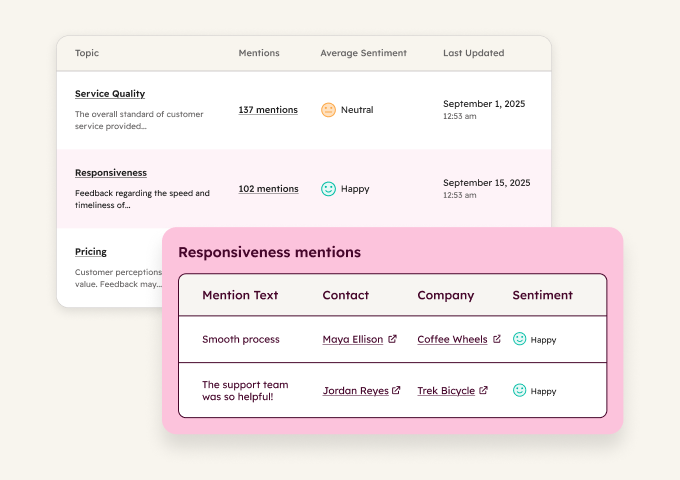
Read Every Survey Without Reading Every Survey
Your customers are telling you what's wrong and what's working. The problem is that the answers are scattered across hundreds of survey responses and call recordings. Feedback Survey Summaries analyze all of this and surface the themes that matter most.
Start with summaries to get instant theme analysis from your survey data. Add Conversation Intelligence to track key terms and topics mentioned in calls, so you catch feedback patterns that don't show up in written surveys.
Start here
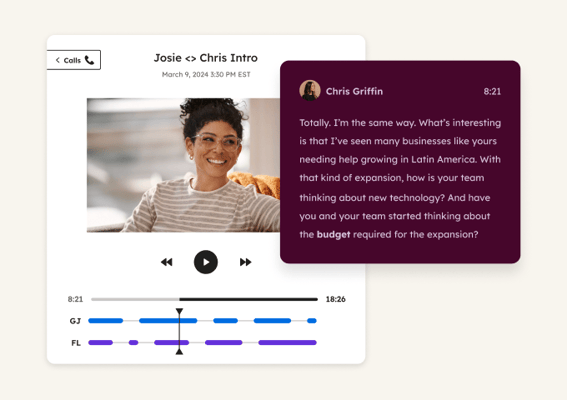
Conversation Intelligence
Tracks key terms and topics mentioned in customer calls to surface common feedback themes that don't appear in written surveys. Use it to catch complaints, feature requests, and competitor mentions from live conversations. Generates reports so you can see trends across your entire call history.
 Emerging
Identify At-Risk Customers
Spot churn signals before customers leave. Breeze analyzes account health, ticket trends, and call patterns to flag at-risk accounts and recommend specific actions to save them.
 Emerging
Drive Renewals and Upsells
Know which customer accounts are ready to expand. Breeze analyzes usage patterns and engagement signals to flag expansion-ready accounts and time renewal conversations right.
 Established
Resolve Support Tickets
Resolve common inquiries instantly, day or night. Breeze handles routine questions using your knowledge base, freeing your team to focus on complex issues that need human expertise.