Logo - Full (Color)

Identify At-Risk Deals

User Persona Sales
Use Case Readiness Emerging

Deals go quiet, but no one notices until it's too late.

AI spots stalled deals and tells sales reps what changed.

ai_deal_intelligence

Catch Stalled Deals Before They Go Cold

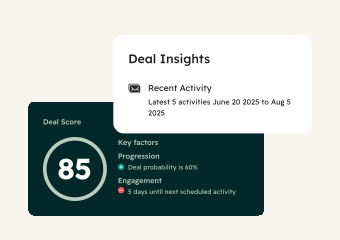
Most deals don't end with a "no." They end with silence. Deal Insights monitors your pipeline for deals losing momentum, scores each on likelihood to close, and flags the ones that need attention before it's too late to act. 

Start with Deal Insights to identify which deals are slipping. Add the Prospecting Agent to research what changed and send relevant follow-ups. Use Breeze Assistant to review deal history and find the right re-engagement angle. 

Learn more

Win

62%

more deals on average with Deal Insights

Have a

52%

higher win rate on average with Deal Insights

The AI deal health score keeps us focused on real opportunities — flagging deals that stall or shift. If one's been sitting in stage for 29 days and the close date has changed four times, it's unlikely to close. We use that insight to coach reps, clean the pipeline, and help them close faster.

KEITH VANDEVENTER

Director of CRM Strategy and Operations

Sandow

Sandow-logo 3.56.00 PM

Sales Hub Professional

Get Started with Deal Insights

Find your at-risk deals and act on them today.

Step 1 - Open Deals

Navigate to Sales, then Deals. Predictive Deal Score scores your active deals on likelihood to close and flags those at risk of stalling. Review the risk indicators on each deal record to see which opportunities need immediate attention.

Step 2 - Review At-Risk Deals

Click into any flagged deal to see why it's at risk. AI analyzes deal stage, time in stage, contact engagement, and activity patterns to explain what's stalling. Each deal includes recommended actions to get it back on track.

Step 3 - Research What Changed

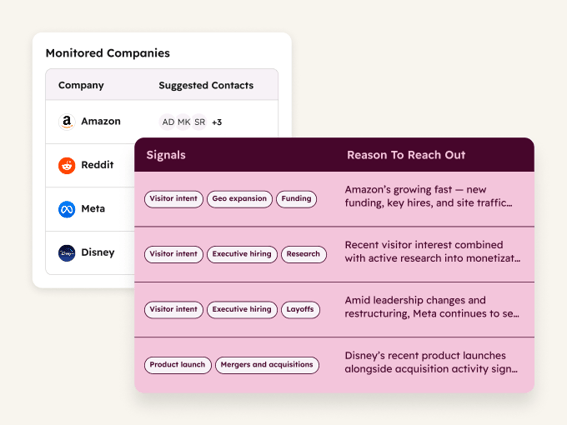
For deals that went quiet, enroll the contact into the Prospecting Agent. It researches the company for recent changes like new funding, job postings, or company news. These signals give your rep a specific reason to reach out instead of sending a generic check-in.

Step 4 - Send Relevant Follow-Ups

Review the Prospecting Agent's research and drafted outreach. Each email references what's changed since the prospect went quiet, so the follow-up is timely and specific. Approve and send, or use Breeze Assistant to adjust the message based on deal history and past objections. 

Turn it on. Watch it work.

Once Deal Insights is monitoring your pipeline, at-risk deals get flagged before they go cold. Your reps know exactly which deals need attention and why, so every follow-up has a reason behind it.

What to expect:

  • At-risk deals flagged with specific reasons

  • Fresh research on what changed at each account

  • Follow-up emails drafted with relevant context

Deals don't go cold overnight. They go cold because no one noticed in time. Now, you will.

Go Deeper with More Breeze Tools

Once you're catching at-risk deals early, add these tools to re-engage and close them.
prospecting_agent_thumbnail@2x

Sales Hub Starter

Prospecting Agent

Researches fresh information about stalled accounts, including new funding, job postings, leadership changes, and company news. Then crafts personalized outreach that references what changed. Use it to re-engage quiet prospects with a specific reason to reply instead of a generic check-in.
breeze_assistant_thumbnail@2x

Free, All Products

Breeze Assistant

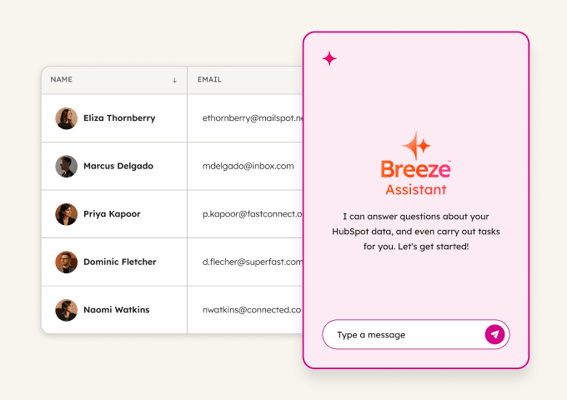
Surfaces full deal history, past objections, and interaction timelines, so reps can find the right angle for re-engagement. Use it to review what was discussed, what the prospect cared about, and what stalled the conversation before reaching back out.