Logo - Full (Color)

Resolve support tickets

Stop making customers wait.

Let AI resolve common inquiries instantly, 24/7.

pictogram-resolve-support-tickets

The Problem

Tickets Pile Up. Customers Wait. Teams Burn Out.

Sound familiar?

  • "Customers submit tickets and wait hours for responses to simple questions."

  • "Our team spends 60% of their time on password resets and billing inquiries."

  • "After-hours requests sit unanswered until morning, and we lose customers."

You need to resolve customer inquiries fast. Manual responses mean long wait times, frustrated customers, and exhausted support teams answering repetitive questions instead of solving more complex issues.

How Breeze Helps

How Breeze Helps

Resolve Half Your Tickets Automatically

AI resolves common inquiries instantly using your knowledge base content. For complex issues, AI suggests relevant articles and drafts responses, so human support staff can respond faster. Start with Customer Agent to handle routine tickets 24/7, then use Breeze tools to speed up everything else.

Start with Customer Agent

All Products, Professional and Enterprise

Most chatbots just answer questions. Customer Agent resolves issues.

Customer Agent responds to and resolves common support inquiries instantly by drawing from your knowledge base articles, help docs, PDFs, and website content. No wait times. No after-hours backlog. Just instant resolutions for customers when they need help most.

Because it's built on HubSpot's Smart CRM, every inquiry gets logged automatically with complete ticket history and resolution details. When complex issues require human agents, they have full context without reading through long threads or asking customers to repeat themselves.

This is the difference between support teams drowning in tickets and teams focused on high-value work.

Turn it on to see real results

  • 65%

    of conversations resolved with Customer Agent

  • 39%

    faster ticket resolution vs teams not using Customer Agent

  • 10%

    higher ticket close rate for teams using Customer Agent

Get Started With Customer Agent

Set up for Customer Agent is straightforward. Here's how to get started.

Step 1 - Create and Configure

Navigate to Service, then Customer Agent, and click "Set up your agent." Name your agent, and then choose a personality like Friendly, Professional, or Empathetic.

Step 2 - Add Content Sources

Connect your knowledge base articles, website pages, help docs, PDFs, or external URLs. Your agent learns from this content to resolve customer inquiries accurately without human intervention.

Step 3 - Test if First

Use the built-in testing tool to preview responses without using credits. When you're confident your agent resolves issues correctly, publish it, and your agent starts handling tickets 24/7.

Step 4 - Deploy to Channels

Choose where your agent will engage customers such as website chat, email, WhatsApp, Facebook Messenger, or voice. Deploy to your conversations inbox or help desk workspace.

Running a complex support operation?

Custom handoff rules, API integrations, and CRM data access let you tailor exactly how your agent handles edge cases and high-priority customers.

Go Deeper with More Breeze Tools

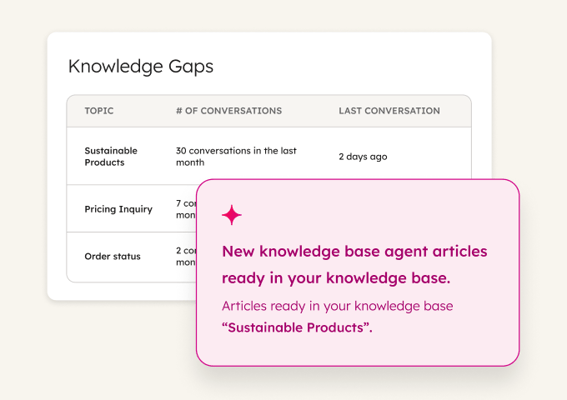
Once Customer Agent is resolving common tickets, add these tools to speed up complex issues and keep your knowledge base complete.
resolve_support_tickets_service_reply_recommendations Service Hub Professional

Reply Recommendations

Generates contextual response suggestions for tickets helping human agents respond to customer inquiries 65% faster by drafting answers based on ticket context and knowledge base content. Use it to maintain response quality while dramatically reducing time spent crafting replies for complex issues.
breeze_assistant_thumbnail_2x Free, All Products

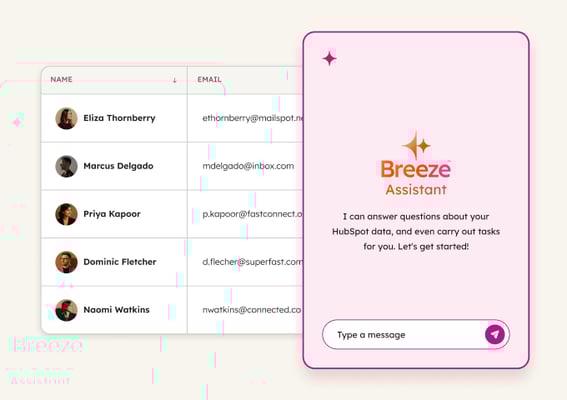
Breeze Assistant

Provides customer context and prepares teams for customer meetings with complete customer profiles by pulling ticket history, call notes, and CRM data instantly. Use it to walk into every customer conversation informed without manually reviewing scattered records.

ticket_summaries_thumbnail_2x Service Hub Professional

Ticket Summaries

Generates ticket summaries automatically saving agents from reading through long threads for handoffs or escalations by highlighting key issues and customer requests. Use it to get team members up to speed instantly when taking over complex tickets.

Breeze customer agent empowers us to serve our diverse audiences—members, donors, course operators, and more—by delivering fast, relevant, and personalized responses. Before customer agent, our team struggled to keep up with demand. Now, even though our rapid growth has resulted in a 75% increase in support tickets, we’ve actually improved response time by 16% and boosted customer satisfaction by 7%.

JOHN MOTHERSHEAD

Director of Member Success

Youth on Course

Youth on Course Logo_Horizontal_Full Color
review_and_route_tickets_service_pictogram Established

Review and route tickets

Get every ticket to the right rep immediately. Breeze categorizes, detects sentiment, and flags urgent issues automatically so priority requests never sit in queue.

send_personalized_outreach_service_pictogram Emerging

Send personalized outreach

Craft outreach that addresses each customer's specific situation. Breeze analyzes ticket history and CRM data to help you send relevant, timely messages at scale.