Logo - Full (Color)

Plan Campaigns

User Persona Marketing
Use Case Readiness Early

Campaign planning shouldn't start with a blank page.

Breeze Assistant turns your brief into a multi-channel marketing plan.

From One Brief to a Full Channel Plan

Campaign planning used to mean days of meetings, shared docs, and disconnected spreadsheets. With Breeze Assistant, you describe your campaign goal and get back channel recommendations, messaging angles, and content ideas grounded in your CRM data.

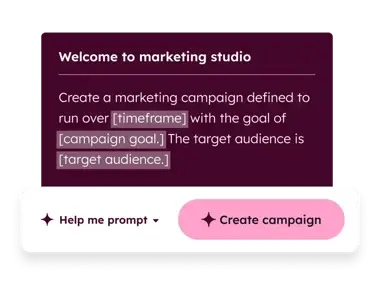
Start with Breeze Assistant to pressure-test your brief and explore content angles by channel. Then use Marketing Studio to build out your campaign structure on a shared visual canvas your team can review and refine together.

Learn more

Marketing studio is like an extension of my team. It has the ability to take care of 90% of the work — from copy to images to metadata — when I need it to, so I can spend my time fine-tuning and optimizing. It even helps refine our brand voice, filling in gaps I might not have thought of and sparking creative ideas for CTAs or graphics.

JAY BAUMGARDNER

Marketing Manager

Clearwing

clearwing-logo-bw

Free, All Products

Get Started with Breeze Assistant

Start your campaign plan with one prompt.

Step 1 - Open Breeze Assistant

Click the Breeze Assistant icon in the top navigation bar of your HubSpot account. It's available across all HubSpot tools at no additional cost.

Step 2 - Describe Your Campaign Goal

Enter a prompt like "Help me plan a campaign to re-engage lapsed customers in Q3." Include your target audience, key message, and goal. Breeze Assistant uses your CRM data and brand context to generate relevant recommendations.

Step 3 - Get Channel and Content Ideas

Breeze Assistant returns recommended channels, messaging angles, and content types based on your brief. Review the suggestions and ask follow-up questions to refine your approach before you start building assets.

Step 4 - Refine Your Brief

Ask Breeze Assistant to challenge your assumptions. Try prompts like "What's missing from this brief?" or "What objections might this audience have?" Use its responses to sharpen your strategy before handing off to your team. 

Turn it on. Watch it work.

Ask Breeze Assistant about your campaign, and it starts generating ideas from your CRM data right away. No setup. No configuration. You get channel recommendations and messaging angles built from your actual business context.

What to expect:

  • Channel recommendations from your brief

  • Messaging angles grounded in CRM data

  • A sharper strategy before you build

This leads to less time staring at a blank brief and more time launching.

Go Deeper with More Breeze Tools

Once your campaign strategy is set, build and track it here.
marketing studio 1-1

Professional and Enterprise, Marketing Hub

Marketing Studio

A shared visual canvas for planning and building campaigns from a brief. Enter your goal and audience, and AI generates a channel strategy with draft assets. Use it when you're ready to move from strategy into execution with your team.