Logo - Full (Color)

Optimize for AI Search (AEO)

User Persona Marketing
Use Case Readiness Emerging

Your buyers ask ChatGPT. Right now, you're not the answer.

AEO shows where your brand appears in AI answers and why.

Get Found Where Buyers Search Now

Buyers using ChatGPT, Perplexity, and Gemini to research vendors don't click through a list of links. They get a direct answer. AEO tracks how often your brand is in that answer, how competitors compare, and which gaps to close first.

AEO in Marketing Hub connects to your CRM from day one, so prompt suggestions are informed by your business context, not generic industry questions. When AEO tells you what content to create, HubSpot's content tools are right there to act on those recommendations.

Learn more

Create

78%

more contacts on average using AEO

Create

82%

more deals on average using AEO

Gain

20%

more web traffic from AI referrals with AEO

In a matter of weeks, we drove roughly 8,000 new website visitors and lifted our Brand Visibility score by two percentage points with AEO, all during one of our slowest months of the year. That visibility boost is already feeding our retargeting and conversion pipeline.

EMILY DAVIDSON

Director of Marketing

Sandler

Sandler-3

Marketing Hub Professional

Get Started With AEO

See your Brand Visibility score in under five minutes.

Step 1 - Set up Your Brand Profile

Navigate to Marketing then AEO. Enter your domain, add your top five to ten competitors, then select a product and audience segment to focus on first. HubSpot then uses your CRM data to suggest the prompts that matter most for your specific business.  

Step 2 - Check Your Visibility Score

Click the “Dashboard” tab to see your Brand Visibility score: the percentage of tracked prompts where your brand appears in AI responses. View results broken out by engine (ChatGPT, Perplexity, Gemini) and track changes over time.

Step 3 - Review Your Tracked Prompts

In the Prompts tab, review the AI-suggested questions your buyers are likely asking, such as "What's the best CRM for mid-size teams?" Add your own or organize prompts into groups by product line or customer segment.

Step 4 - Analyze Competitors and Sentiment

Check the Sentiment tab to see how your brand is being characterized in AI responses, not just whether you appear, but how you're described. Then scroll down to the Competitor Landscape section to review your Share of Voice relative to competitors and see your competitors’ Brand Visibility scores over time. 

Step 5 - Explore Your Citation Sources

Click the Citations tab to analyze the sources AI is pulling from. See how often your brand is mentioned across citations you don't own, and analyze the content formats and channels that perform best for your tracked prompts.

Step 6 - Act on Your Recommendations

Open the Recommendations tab to see a prioritized list of actions to improve your visibility. Each recommendation includes a full content brief: suggested title, target audience, and primary keywords. Use HubSpot's content tools to act on your recommendations without switching platforms.

Step 1 - Set up Your Brand Profile

Navigate to Marketing then AEO. Enter your domain, add your top five to ten competitors, then select a product and audience segment to focus on first. HubSpot then uses your CRM data to suggest the prompts that matter most for your specific business.  

Step 2 - Check Your Visibility Score

Click the “Dashboard” tab to see your Brand Visibility score: the percentage of tracked prompts where your brand appears in AI responses. View results broken out by engine (ChatGPT, Perplexity, Gemini) and track changes over time.

Step 3 - Review Your Tracked Prompts

In the Prompts tab, review the AI-suggested questions your buyers are likely asking, such as "What's the best CRM for mid-size teams?" Add your own or organize prompts into groups by product line or customer segment.

Step 4 - Analyze Competitors and Sentiment

Check the Sentiment tab to see how your brand is being characterized in AI responses, not just whether you appear, but how you're described. Then scroll down to the Competitor Landscape section to review your Share of Voice relative to competitors and see your competitors’ Brand Visibility scores over time. 

Step 5 - Explore Your Citation Sources

Click the Citations tab to analyze the sources AI is pulling from. See how often your brand is mentioned across citations you don't own, and analyze the content formats and channels that perform best for your tracked prompts.

Step 6 - Act on Your Recommendations

Open the Recommendations tab to see a prioritized list of actions to improve your visibility. Each recommendation includes a full content brief: suggested title, target audience, and primary keywords. Use HubSpot's content tools to act on your recommendations without switching platforms.

Set it up. Watch it work.

Once AEO is set up, you see exactly where your brand stands across ChatGPT, Perplexity, and Gemini. Your CRM data informs smarter prompt suggestions from day one. And because AEO lives inside Marketing Hub, you can act on recommendations without leaving the platform.

What to expect:

  • Your Brand Visibility score, by engine

  • Competitor gaps, named and ranked

  • Content recommendations ready to act on

The marketers who mastered SEO early built growth engines that lasted a decade. AEO is next. 

Go Deeper with More Breeze Tools

More ways to see, measure, and act on your AEO performance.
on page seo, free hubspot aeo grader reveals how llms perceive your brand after on-page seo fixes

Free, All Products

AEO Grader

A one-time brand-level assessment of how answer engines describe you today. Use it to see directional scores across brand recognition, sentiment, and share of voice.
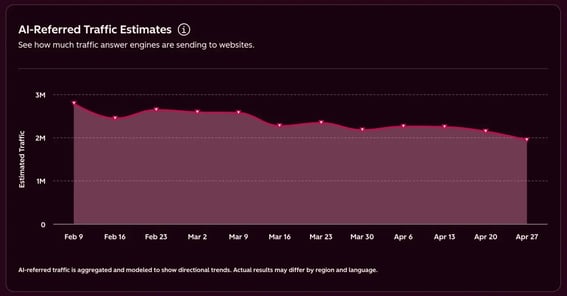
ai-referred-traffic-estimates-chart-aeo-sensor

Free, All Products

AEO Sensor

A free, public dashboard tracking volatility in answer engine citations, AI-referred traffic trends, and visibility benchmarks by industry. Use it to monitor whether the AEO landscape is shifting before making decisions about your strategy.