Logo - Full (Color)

Generate Content in Real Time

Features you'll explore

AEO

Learn how Content Agent researches your brand, competitors, and audience, then creates blog posts, social content, and landing pages in minutes.
build_demand_content_agent_EN (1)

Close Visibility Gaps Without the Backlog

Buyers start their research in AI. If your brand isn't showing up in those answers, competitors fill the gap — and most teams don't have the bandwidth to create content fast enough to keep up.

Content Agent changes that. It researches your brand, competitors, and keywords before writing a word, so you get a research-backed draft without the brief, the tabs, or the back-and-forth. Layer in Social to extend reach on LinkedIn, and Campaign Agent to scale one idea into a full multi-channel campaign.

Learn more

On average, customers that use HubSpot AEO

traffic

20%

more AI referred web traffic

leads

2.6x

more leads generated

deals

82%

more deals created

Expansive-Solutions-full-120x120

The combination of AEO and Content Agent has transformed content creation from a resource-intensive process into a scalable growth engine. We are creating more relevant content, increasing visibility, and competing in AI search in ways we simply could not before.

Neal Williams

Marketing Manager

Qwikkit

Marketing Hub Pro and Enterprise

Get Started With Content Agent

Go from idea to published content, without the hours in between.

Step 1 - Set Up Brand Voice

Navigate to Settings, then Brand Identity. Configure your brand voice, tone, style guidelines, and ICP details. Content Agent loads this context before writing so every draft reflects your positioning instead of producing generic output.

Step 2 - Review AEO Recommendations

Open the AEO tool to see where your brand is and isn't being cited by AI search engines. Each recommendation shows the topic, the content brief, which competitors are getting cited, and what type of content is most likely to close the gap.

Step 3 - Generate Your First Draft

Click generate on any AEO recommendation. The content agent researches the topic, pulls keyword data, reviews competitor content, and writes a draft in your brand voice. Review and edit before publishing to your blog or landing page.

Step 4 - Extend Across Channels

Use Social to turn a published blog post into LinkedIn posts for amplification. Or use Campaign Agent to create a coordinated set of assets across blogs, social, and landing pages from a single content idea.

Go Deeper with Related Tools

Add these tools to capture more conversation context and keep every deal on track.
Start here
aeo_build_sui_UPDATE-1

Marketing Hub Pro & Enterprise

AEO

Tracks how often your brand appears in ChatGPT, Perplexity, and Gemini compared to competitors. Shows which sources AI is citing in your category and what content types dominate those citations. Use it to get a prioritized list of what to publish next, then generate that content with Content Agent in one click.
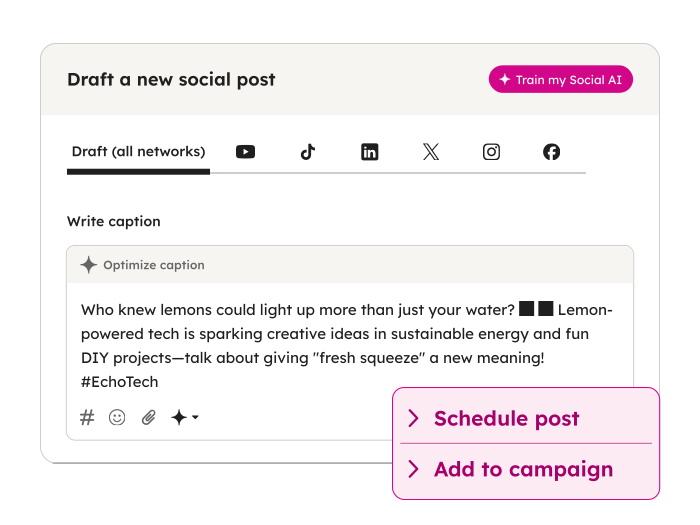
MH_Social_PostGenerator_EN_03102026

Marketing Hub Pro & Enterprise

Social

Generates LinkedIn posts and articles from AEO and social recommendations. Extends your content across the channels where buyers are actively researching. Use it to turn a published blog post into social content without writing from scratch.
MH_CampaignAgent_Brief_EN

Campaign Agent

Turns a single goal into a connected set of campaign assets, including blog posts, social posts, and landing pages. Use it when you want new content to scale across every touchpoint from the start instead of creating each asset one by one.