A Guide from TikTok & HubSpot Media Creators

E2E Page Used for the Pull Quotes Module

Please contact the media dev team before modifying the content in this page.

Start generating high-quality leads with TikTok and HubSpot. (Plus, activate a special offer from TikTok.)

                     This guide was brought to you by
TikTok-logo-CMYK-Horizontal-black

It's no secret that everyone wants to be a content creator these days. In fact, the number of people calling themselves full-time creators jumped to 1.5 million in the U.S. alone.

As major outlets churn out bland, obviously AI-generated content without a personal touch, audiences are craving more credible, human-driven media than ever.

It’s not hard to understand what all the buzz is about. It’s grown into a $250+ billion industry and is projected to top $1 trillion within the next decade. 

Creators: It's Time to Get Serious

HS_Pictograms_Social_Media_800px

As the creator economy grows each year, the competition gets fiercer than ever.

“Content Creator” is no longer a side hustle title. It’s not enough to simply show up and post anymore. The creators pulling ahead are the ones who treat their content like a business. They build systems, experiment with distribution, and make smart use of the tools available to them.

So how should you (a creator or media entrepreneur) think about differentiating yourself? One key is to give yourself as much time as possible to learn about your audience, create content for them, and continuously refine strategies that meet them where they are. 

Today’s technology makes these steps even easier. But with new products and solutions released daily, it’s hard to know which tools will actually help you churn high-quality content that actually cuts through the noise.

To help you build a strong foundation of tools and tech tips that position your work to thrive, we built this guide filled with tactical tips from career creators, AI prompt hacks, tool recommendations, and more.

“This version features a left-aligned H2 and shows the full author details, including name, role, and profile image.”

yonatan-profile-500
John Smith

CEO, Tech Company

“Here the heading is a centered H3, paired with the author’s name and role but no profile picture.”

Jane Doe

Marketing Director

Breaking Down All of TikToks New Suite of AI Tools

Take your TikTok Leads to the Next Level

Start generating high-quality leads with TikTok and HubSpot's integration.

How Creators Use Technology

Being a creator may look fun and lighthearted. But, the work (often done by a team of one) can be exhausting. Luckily, you're tech stack can help you be the talent, the producer, the marketer, and the CEO of your personal brand.

Tap through the tabs below for a few examples and prompts around what creators prioritize in their toolbox.

TEMPORARY FIX_Cafe_Illustration

“This layout uses a left-aligned H3 and displays only the author’s name, keeping it clean and minimal.”

Alex Johnson

Content creation can feel like a non-stop brainstorming exercise. You might constantly be wondering, “Would my audience like this?” or, “Should I try this new type of series?”

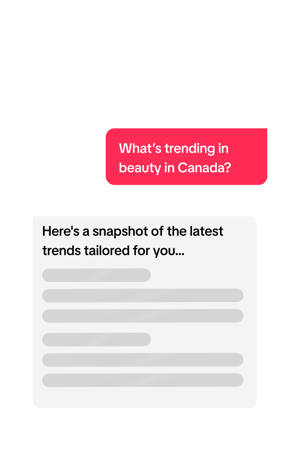
With tools like HubSpot Content Hub. ChatGPT, and Claude, you can get a deeper understanding of your audience, which will help you tailor your content. Here’s an example of how a Gen Z creator focused on relationship coaching might use an AI prompt to generate a handful of fresh content ideas:

prompt creators can use brainstorm content topics using AI tools like GPT or Claude

From there, you can brainstorm specific content ideas that will speak to their questions, pain points, interests, etc. Here’s what that looks like in Content Hub:

Continuing to refine and dig deeper into AI brainstorming prompts.

Keep in mind that AI still isn't perfect. No matter which tool you use, its answers
can be hit or miss. So, you still need to be the expert in decision-making for your audience.

Take what you (or your target clientele) will like, use items you slightly rework for inspiration, and leave the rest behind.

 HubSpot AI assistant brainstorm for content ideas


You can even go beyond initial ideas to craft outlines, scripts, and briefs. You can take one topic idea from the prompt above and create an outline with Content Hub: 

HubSpot AI assistant brainstorm for content ideas AI brainstorm for content ideas; post ideas for a coach


Pro tip: Don’t rely too much on what AI creates at this stage. Some are pretty solid, while other bits feel a bit cheesy. Instead, use these as brainstorming points to try and find unique stories and advice that you can share from your own experience. 


No matter which platform you use, social media video is one of the most effective ways you can build trust and a meaningful relationship with your audience.

Take Victoria Morsew, for example. She’s a lifestyle creator who posts her life as a working mom and what it’s like trying to grow a TikTok account. 

“Being true to yourself is the best thing you can do,” she said in a recent video.

Creating content that feels natural is going to be the easiest (and fun!) to sustain.

▶️ Get more of Victoria's tips in this video.


Organic reach can only get you so far. If you’ve started to build an audience and want to add fuel to your growth, you can experiment with paid strategies. The best place to start is by boosting what already works. If a TikTok video is getting outsized engagement, putting even $50 to $100 behind it can multiply your reach overnight.

The key is connecting ads to your systems. With tools like TikTok Ads (plus its HubSpot integration), you can watch leads flow straight into your CRM or email list. That’s how you turn attention into an audience you actually own (and that should be your ultimate goal!).

Think of it less as “buying ads” and more as investing in distribution. When the right content hits, paid reach makes sure it compounds for you.

Creator Tech Stack Essentials

Find out what our favorite tools for creators are and get a complex list of added solutions you can use tap and grow creator audiences on TikTok, elsewhere on social media, and across the world wide web.

tiktok ads

TikTok's Business & Creator Solutions

TikTok Ads Manager

More than half of TikTok users say they’re likely to purchase something they discovered through a lead-generation ad.

That strong conversion potential comes as no surprise- TikTok’s algorithm is built to match the right content with the right audience, and its ads are targeted in a way that feels just as natural and engaging as organic content.

Meanwhile, TikTok users are 1.3X more likely to sign-up for something within an ad compared to traditional social media & search platforms

The Data Behind TikTok

Half of TikTok users say most advertisements they see there “don’t feel like ads."

But that's not the only reason we recommend TikTok for creators.

Check out the stats to the right. >>

Source: TikTok, 2025

For creators, particularly those building their career on this app, TikTok Ads is one of the most cost-effective ways to amplify and track the ROI of your top pieces of content.

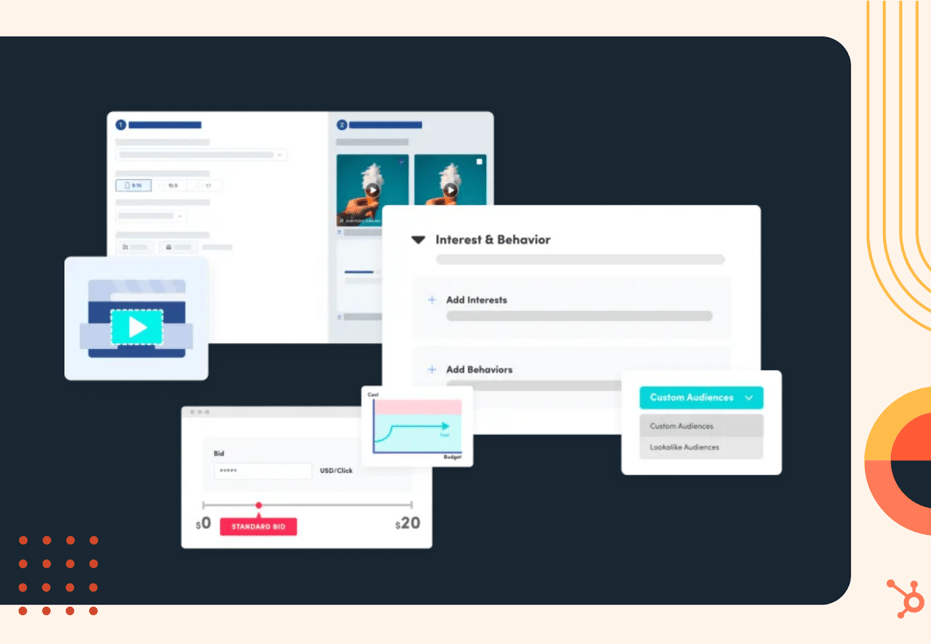
Not only does TikTok Ads Manager provide easy tools to help creators launch their ads, but they also offer a suite of resources to optimize this content from the very beginning of production. These features include:

multimedia callout image

For creators, particularly those building their career on this app.


tiktok symphany

For creators, particularly those building their career on this app, TikTok Ads is one of the most cost-effective ways to amplify and track the ROI of your top pieces of content.

Not only does TikTok Ads Manager provide easy tools to help creators launch their ads, but they also offer a suite of resources to optimize this content from the very beginning of production. These features include:

  • Top Ads Dashboard: Peek at the hottest TikTok ads and steal the spotlight moments that make them pop.
  • Trending Products Insights: Spot which products are going viral and see who’s loving them.
  • Trend Discovery: Uncover rising sounds, hashtags, and creators before everyone else does.
  • TikTok Symphony: A suite of generative AI tools that help you make TikTok content that sings.

Once those ads are live, TikTok still has you covered with detailed dashboards to show you how well your efforts are performing.
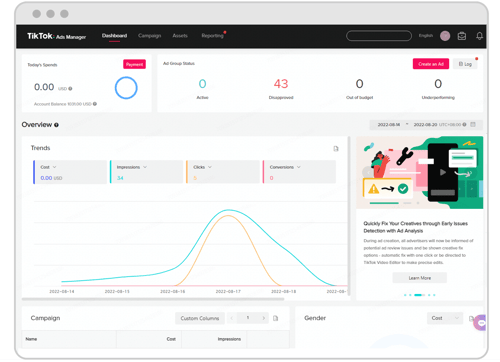
tiktok for business dashboard

TikTok’s Lead Ad Integration with HubSpot

TikTok creators aren’t just limited to the tools on the platform. With integrations with platforms like HubSpot’s CRM, you can magnify the impact and learnings you get from each viral TikTok campaign you launch. 

For example, with HubSpot’s TikTok Lead Ads integration, you can easily collect, sync, and track leads you’ve gathered from your TikTok ads in your free HubSpot CRM.

This capability allows you to see exactly how many viewers are converting to leads (and better deploy content that results in more paying customers or clients.)


“A centered H2 with no author details at all—just the quote itself taking the spotlight.”

Take TikTok Ads to the Next Level

Connect TikTok with HubSpot’s free CRM to sync contacts in real time- without code- so your team can act on leads instantly. And, unlock a special offer when you spend on TikTok.

Terms and conditions for TikTok offer apply. This special offer is provided exclusively by TikTok for a limited time.
HubSpot_TikTok_Partnership image
Content_Illustrations_Color_LightBG 1

Critical Tools for High-ROI Content Creation

Whether you're building your brand on social media, in a newsletter, a podcast, or another channel, the content you put out will ultimately be key to your success at gaining visibility and trust from audiences that could ultimately lead them to buy what you're selling.

If you're looking to build a strong content strategy, or expand the content you publish the tabs below highlight tools for each vital step of content marketing.

Expanding Your Social Media Tech Stack

You can't just expect to go viral by posting whatever you'd like. Social ROI requires knowing your audience and catering your strategy to give them what they want. Your tech stack isn't complete without tools that help you ideate, track, and learn from your content. Click the categories below to reveal tools for each.

social media research tools

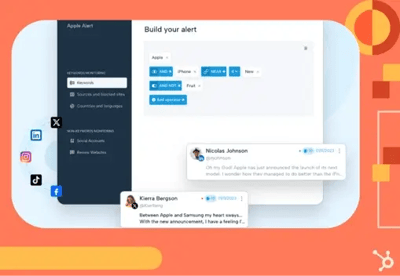
Many tools can help you discover viral topics across social channels and other public spots sites. This can help learn what your audience cares about, and ideate plays that caters to them.

  • HubSpot Social Features: With these features, you can see how social mentions and public conversations tie back to leads, customers, and campaigns.
  • Brandwatch: Brandwatch can analyze public sentiment, track competitors, and highlight trending topics. Large creators and businesses use it to spot content opportunities before competitors or track their brand reputation.
  • Mention: A simpler, more affordable option for smaller creators or businesses. Mention tracks public keywords, hashtags, and brand mentions across social platforms and blogs. It’s especially useful if you want to monitor your name or brand across the web without investing in pricey enterprise tools.

social-media-tracking

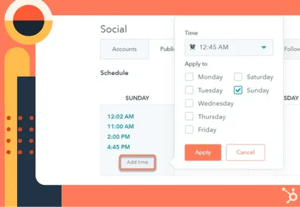
Tne of the biggest struggles of being a a creator is staying consistent. There’s the line between treating content like a hobby and scaling it like a business — and that’s where the right tools can be super valuable. 

  • HubSpot's Social Suite: On top of post scheduling features that connect to most major platforms, HubSpot provides a Top Posts Report that allows you to see and schedule future posts for times audiences are most likely to engage. It also has a  “Publish like a human” feature that creates a schedule similar to what a human social media lead would create.
  • Buffer: Buffer allows you (as well as any teammates you have to queue, schedule, repurpose, and drag-and-drop posts into a collaborative social calendar for your go-to platforms. It also offers post analytics and an AI assistant if you want extra support.
  • Later: Later is a more advanced (but still user-friendly) scheduler that's especially popular with creators and brands on Instagram and TikTok. Beyond just queuing up posts, Later also gives you trending topic suggestions and a helpful built-in Link in Bio tool to turn social followers into customers.

Tech Takeaways from Thriving Creators

Before you head off to implement your newest tools to your tech stack, get a handful of real creators' top tips for building a tech strategy that scales with your career. 

quote-illustration-1